• DIY
  • Tips & Tricks
  • Health & Beauty
  • Home & Garden
    • Home decor
  • Food & Beverage
    • Recipes
  • Holiday
    • New Year’s Day
    • Valentine’s Day
    • St. Patrick’s Day
    • Easter
    • Spring
    • Father’s Day
    • Summer
    • Halloween
    • Thanksgiving
    • Christmas

My List of Lists

Crafts. DIY Projects. Gardening. My List of Lists is a lifestyle blog providing free tips for baking, crafts, DIY projects, holidays, parties, home decor and more.

DIY, Tips & Tricks · July 10, 2020

Screenshot a PC: How To Do It Now

Screenshot a PC: How To Do It Now

Screenshotting something you found online is handy in a myriad of ways. I’ve used the tool on my laptop plenty of times to communicate my troubles with an IT guy or two! Well, screenshotting on a PC is actually just as easy as doing it on a laptop.

All you have to do is press Cntrl+PrintScreen (sometimes shortened to ‘PrtScn’ depending on the laptop). Once activated, your computer will automatically save a copy of your screenshotted file to your “screenshots” folder. 
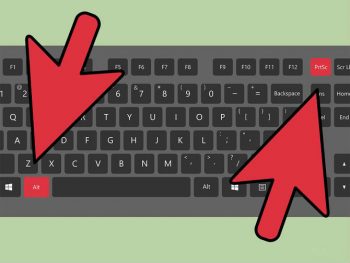
screenshot a PC
Pages: 1 2 3 4

You might also enjoy

12 Things to do with Magnets
Why Every House Needs A Job Jar
How to Reuse and Repurpose Your Old Keurig Cups| Keurig Cup Crafts, Keurig Cup DIYs, Repurpose Projects, Recycled Crafts, Craft, Crafting, Easy Crafts. #KeurigCupCrafts #RepurposeCrafts #RecycledCrafts #EasyCraftsHow to Reuse and Repurpose Your Old Keurig Cups
« Pick-Me-Up Ideas … Instant Boost of Happiness
Unforgettable Father’s Day Gift Ideas »

Leave a Reply Cancel reply

Your email address will not be published. Required fields are marked *

Design by SkyandStars.co

Copyright © 2026